Blogger Widgets

Computer

Computer is an Electronic Machine which receives input from user, stored it, proceed it and give output which is useful for mankind. Modern computers are electronic and digital. The actual machinery -- wires, transistors, and circuits -- is called hardware; the instructions and data are called software.

Network

A network is a group of two or more computer systems linked together. There are many types of computer networks, Including Local-area networks (LANs), Wide-area networks (WANs), Campus-area networks (CANs), Metropolitan-area networks MANs), home-area networks (HANs)

News

News has two priorities: it must be current, and it must mean something to people. A story about the environment and a story about the Oscars can both be newsworthy, for different reasons. On the surface at least, the objective of news is to inform the audience. It's the job of all the news media to tell people what's going on in their community - locally, nationally or globally. In this sense, the news media provide a valuable public service.

Mobile Prices

A mobile phone (also known as a cellular phone, cell phone and a hand phone) is a device that can make and receive telephone calls over a radio link whilst moving around a wide geographic area. It does so by connecting to a cellular network provided by a mobile phone operator, allowing access to the public telephone network. By contrast, a cordless telephone is used only within the short range of a single, private base station.

Wallpapers

On a computer that is provided with a desktop kind of user interface, wallpaper is the background pattern or picture against which desktop menus, icons, and other elements are displayed and moved around. A wallpaper image can be in a JPEG or a GIF file format.

Social WEB

Showing posts with label Yahoo Tricks. Show all posts

Make Free Calls/SMS using fring

fring is a mobile internet service and community that allows you to access and interact with a variety of communication services such as Skype®, MSN® Messenger, Google Talk™, ICQ, SIP, Twitter, Yahoo!™ and AIM®. Through fring, you can send and receive calls as well as message all of your contacts all will using your cellular data plan or a WiFi connection rather than use your minutes. You can even make affordable local and international calls to landline and regular cellular numbers using your SkypeOut/SkypeIn account or almost any VoIP service. fring is compatible with Symbian 8, 9.1, 9.2, Windows Mobile 5 & 6 and UIQ handsets.
  • Availability – fring service can be used anywhere you have cellular or WiFi network connectivity.
  • Free Calls - fring allows you to make free calls to all of your Skype, MSN Messenger, Google Talk, ICQ, Yahoo! and AIM friends. 
  • Instant Messaging - With fring you can instant message your Skype, MSN Messenger, Google Talk, ICQ, SIP, Twitter, Yahoo! and AIM friends. 
  • Special Features - fring users can send and receive files, in addition to setting up auto-roam so that fring automatically detects when you move from one WiFi hotspot to the next.

Fake Mailer To Send Anonymous Email


Hi everyone today im going to post how to send fake email.ok so fake email is a online free email sender and you can change sender, reciever, forward, subject and title anything you want. The most reason to send fake email is a that you can use fake email for hacking password by using phishing site. In this article i will show you website that you can use to send fake email.

Fake Mailer to send anonymous Email:

1. Go to Fake Mailer website to send anonymous email.
2. Now, enter the information as shown: From Name: The Sender name which will appear on Email From Email: The sender Email address To: Victim email address Subject: Subject of the Email Content-type: Select text/html Text: The content of your mail. Put something which will make your victim to click on your phisher link. 3. Now, enter captcha and hit on Send. 4. Your victim will receive mail like this:
So friends, I guess this Fake Mailer is pretty easy to use and also very handy to send anonymous email to your friend or victim. If you find any problem in using this Fake Mailer to send anonymous email, please mention it in comments.
 Enjoy Fake Mailer to send anonymous email to your victim…

Camfrog Video Chat


CAMFROG VIDEO CHAT IS WONDERFUL CAM CHATTING SOFTWARE. CAMFROG VIDEO CHAT ALLOWS TO VIDEO CHAT WITH VARIOUS PEOPLE OF THE WORLD. CAMFROD VIDEO CHAT HAS CHAT ROOMS FULL OF MEMBERS AND CAMFROG VIDEO CHAT SOFTWARE IS ABSOLUTELY FREE. CLICK ON DOWNLOAD TO DOWNLOAD CAMFROG VIDEO CHAT NOW

TOP 5 FIREFOX ADDONS TO REMAIN ANONYMOUS WHILE SURFING


Firefox is one of the most reliable and  secure web browser while provides many features other than secure browseing. Firefox can even be used to remain Anonymous while surfing The World Wide Web. So, this article will talk about Top 5 Addons to remain Anonymous.
Below are my favrouite Addons while provied Anonymous Surfing.


AWB PROXY
This proxy provides UK based anonymous proxy server. It is a reliable and secure proxy addon
Get Here.


TOR BUTTON
This one of the best proxy addon, it is the only proxy that help you to prevent IP address leakage, cookie leakage and other general privacy and stealing attacks
Get Here


FROXY PROXY
Froxy poxy is a advanced anonymous serving management tool, It can also be used to bypass content filtering. it is one of the most releable proxy among all.
Get Here


PROXY TOOL
This proxy has a user friendly environment, providing 10 different HTTP refferes, auto proxy rotation and other intresting and usefull features.
Get Here


               AUTO PROXY
It is another good and releable proxy addon, providing good anonymity.
Get Here

-: Chat with Friends through ms dos Command Prompt :-


1) All you need is your friend's IP Address and your Command Prompt.

2) Open Notepad and write this code as it is.....!

@echo off
:A
Cls
echo MESSENGER
set /p n=User:
set /p m=Message:
net send %n% %m%
Pause
Goto A

3) Now save this as "Messenger.Bat".

4) Open Command Prompt.

5) Drag this file (.bat file) over to Command Prompt and press Enter.

6) You would then see something like this:

7) Now, type the IP Address of the computer you want to contact and press enter
You will see something like this:

8) Now all you need to do is type your message and press Enter.
Start Chatting.......! 

How to run your own private chat server


How to run own private chat server NO CONFIGURATION NEEDED!You will need:
HachaT Server
HachaT IM Client
both can be found here: http://adf.ly/r2YZ

From here on out it will be VERY simple!!

Step 1: Extract contents of both files.

Step 2: Start your HachaT Server and Client programs.

Step 3 (a little bit harder):
Goto http://www.no-ip.com/ and make an account.
Login and click the "Hosts/Redirects" tab.
Click "Add New" on the menu bar to the left.
Change the host name to what you want and don't change anything else.
Click "Create Host".
Download and Install the No-IP Client.
Log into your No-IP client and click "Select Hosts".
Make sure that your host is checked.
Click File;Preferences; and make sure "Run on Start up" is also checked.
Now click refresh on the main client page.

Step 4 (only for people on routers): Port forward to port 2323 using this tutorial as a guide:http://adf.ly/r2ea

Step 5: Type your host link (like this 'host.whatever.com' leaving out http://) and a nickname. Than click connect

Step 6: Share HachaT with your friends and tell them yr server info!

Beaver's SMS Bomber Pro

Features Include:
Full Feature List:
Custom SMTP Server (Make Sure You Type It Right)
Custom Carrier Gateway (If Your Victims Gateway Is Not In The Large List You May Find And Enter it Yourself)
Custom Number Of SMS To Send (Finally Have Where You Can Enter Any Amount To Send)
Save/Load Settings (Will Save Everything You Enter In The Fields, Restarting Your Computer Will Lose The Saved Settings)
Fixed XP GUI Issues
Stop Bombing At Any Time
Watch The Number Of SMS Sent In The Title Bar
No Longer Freezes While Sending
Added A Recent slave's Box Where You Can Select An Entry And Right-Click It To Bomb It Again Or Delete It From The List
Save/Load Recent Victims List

GMail Is The Default SMTP Server That Is Used Which Has A Limit On The Number That Can Be Sent
Has A Lot Of Carriers Already Pre-Entered For You.
SMS Looks Like

FRM: Senders Email
SUBJ: Subject
MSG: Message

What Is New In The Pro Version:
New GUI
Error Handling, For Example If There Was An Error Sending The Message It Will Ask You If You Want To Change The E-mail/Password You Are Using. This Is Just One Of The Many Error Handling I Have Added.

[Image: 1XB4F.png]


Change the Title of Yahoo Messenger


Here’s how you change the title text that appears at the top of the Messenger window. By default, this is “Yahoo! Messenger”, followed by your status. Simply edit the ymsgr.ini file, which you will find in the same folder as the Messenger program, in your Program Files folder. Locate the file and open it in Notepad. Then, at the end, add the following:

[APP TITLE]
 caption=YOUR TEXT

Here, “YOUR TEXT” is whatever you want in the title bar. Save the file and close Messenger. When you restart it you will see your text in the title bar.

Chat without Yahoo Messenger or Gtalk

Can we chat without Yahoo messenger? Most of us are familiar with the most widely used applications such as Yahoo messenger and Gtalk to carry out chatting with our friends. But here I’ll show how to chat without Yahoo messenger or Gtalk. As we all know the information we exchange with their servers(Yahoo or Gtalk) are recorded and stored along with the corresponding IP addresses. This may hurt our privacy since all the information we exchange while chatting has to pass through a third party server.

Moreover if the matter is highly confidential, then it is necessary to have a totally private chat where the messages are exchanged only between the people involved in the chat and not with any other third party servers. At these situations, it is better to chat without Yahoo messenger.

So, how to carry out a private chat without Yahoo messenger or Gtalk?

For this purpose there exists many softwares that support’s you to host a web-based chat system without any additional software or services. So with these softwares the exchange of messages takes place directly between the two persons engaging in the chat and will not pass through any other third party server. This ensures 100% privacy and eliminates the desperate need to chat with Yahoo messenger.


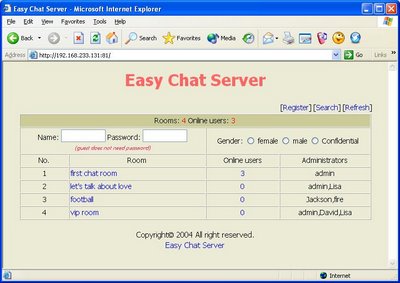
One of my favorite program for private chat is Easy Chat Server


Easy Chat Server is a Windows program that allows you to host a web-based chat system without any additional software or services. Unlike other chat server, you do not need to install Java. It allows you to build one or more web-based chat rooms on your machine, and provides advanced chat functionalities aiming to offer discussion space for your users, customers and partners.

Here are some of the screenshots of Easy Chat Server.


Key Features of Easy Chat Server:

  • Easy to use, Simple installation that will have you up and running in minutes.
  • 128-Bit Security Socket Layer(SSL) support. Support for server level certificate creation.
  • Instantly runs a complete chat server on your PCs – does not need to install any Web Server.
  • Supports full private messaging and One to One private chat.
  • Support of images, smileys, avatar icons.
  • Full chat and access logs are available within the chat server.
  • Have a built-in IP Filter, supports banning/unbanning IP address, securely.
  • Multiple styles available for the user to customize rooms.
  • Unlimited rooms and users, no any annual, per-user, or maintenance fees.
  • No spyware, adware or other unwanted extra programs.


10 Best Yahoo! Messenger Tricks and Hacks

Yahoo! Messenger is an instant messaging program which is compatible with all Windows versions. While instant messaging is the focus of Yahoo! Messenger, there are several special tricks that can enhance the user experience. 
Here are my 10 Best Yahoo! Messenger Tricks and Hacks:

1. Find invisible users on your Yahoo! Messenger list


Want to find out someone who’s hiding from you? You can easily do so by going to Yahoo! Invisible Checker. All you need to do is type in the Yahoo! ID and the particular users status will be revealed.

2. Invisible nickname on chat rooms 


Just go to edit profile and in the nick name type a (space character) on it just press Alt 0160 ( or ALT+255 ) and save it.
Now go to any Yahoo! chat room and you’ll notice that your nick name is empty. [Alt+0160 is a keyboard shortcut for space]

3. Run Multiple Instances of Yahoo! Messenger on same system


Some of you might be having more than one Yahoo! ID would like to log in simultaneously. Here is an easy way to do it without installing any sort of software. You just have to edit the registry and voila there you go. Follow the instructions below:
  • Download the following -multiyahoo.reg and save it to your hard disk.
  • Double click on it. 

  • The above dialog will popup, click ‘Yes’
  • Start the yahoo messenger login with your first ID. Then again start another yahoo messenger by clicking on the messenger icon and log in with your second ID.This tweak works with all versions of Yahoo Messengers. 
4. Removing Ads from your Yahoo! Messenger


If you are using Yahoo! Messenger 8.0, then you can disable ads by following the below steps:
First close the Yahoo! Messenger.
Save this .bat file and execute it. (Note: You won’t be able to enter the chat rooms if you use this patch.)
The above fix doesn’t work for Yahoo! Messenger 9 Beta. Here’s a way to disable the ads in Yahoo! Messenger 9:
Make sure the Yahoo! Messenger isn’t running, if it is then just close it.
Now backup the following file C:\Program Files\Yahoo!\Messenger\Yahoo!Messenger.exe (create a new copy)
Download HxD hex editor.
Open C:\Program Files\Yahoo!\Messenger\Yahoo!Messenger.exe in the hex editor
Now go to the offset 295928 (in HxD: Search/GoTo)
Look at the right column and replace y from “y.m.s.g.r.a.d.s” with p
Save the file and close HxD.
Note: This approach breaks Yahoo! Messenger’s terms of service.
If nothing works try launching this file.

5. Yahoo! Smiley Codes


You can make use of all smileys including hidden ones in your messenger by using YEmotePLUS plugin.

6. Creating Custom Profiles for Chat


You can create custom profiles with different name, sex and other details from Yahoo! Create/Edit Profiles. You can use these for chat services only.

7. Change the Yahoo! Messenger Title Bar


You can change the text that appears at the very top of the Yahoo! messenger window by editing the ymsgr.ini file.
1. Go to Program Files\Yahoo!\ and open ymsgr.ini.
2. Then at the end, type this:
[APP TITLE]
caption=YOUR TEXT
3. Change YOUR TEXT to whatever you want it to say. Then save the file and close messenger. When you restart messenger you will see your new message.

8. Online Status Changer and Manager


HyperIM is currently the best status changer & manager for Yahoo! messenger available at present. You can download it here.

9. Access Yahoo! Messenger Chat archives while offline

You can access your Yahoo! chat logs using Yahoo! Message Archive Decoder. It reads Yahoo! Messenger archive files (.dat files) and presents them in a format that you can read. It decodes the message archive without logging in (offline mode and no passwords required). You can download it here.

10. Retrieve Yahoo! Messenger Display pictures

Y! Display Pic will retrieve Yahoo! users even if they are offline or invisible. You can download it here.

Do you have questions, comments, or suggestions? Feel free to post a comment!

Multiple login in Yahoo

Without Using any Software

You can login with multiple id’s on the same yahoo messenger
without any download or patch .

Follow these steps :

1. Go to Start —-> Run . Type regedit, then enter .
2.Navigate to HKEY_CURRENT_USER ——–> Software —>yahoo —–>pager—->Test
3.On the right page , right-click and choose new Dword value .
4.Rename it as Plural.
5.Double click and assign a decimal value of 1.

Its done!!
Now close registry and restart yahoo messenger and try Multiple Login.