Showing posts with label IP Tricks. Show all posts
Fake Mailer To Send Anonymous Email
11:47 AM
Internet, IP Tricks, Security, Yahoo Tricks
Hi everyone today im going to post how to send fake email.ok so fake email is a online free email sender and you can change sender, reciever, forward, subject and title anything you want. The most reason to send fake email is a that you can use fake email for hacking password by using phishing site. In this article i will show you website that you can use to send fake email.
1. Go to Fake Mailer website to send anonymous email.
2. Now, enter the information as shown: From Name: The Sender name which will appear on Email From Email: The sender Email address To: Victim email address Subject: Subject of the Email Content-type: Select text/html Text: The content of your mail. Put something which will make your victim to click on your phisher link. 3. Now, enter captcha and hit on Send. 4. Your victim will receive mail like this:
So friends, I guess this Fake Mailer is pretty easy to use and also very handy to send anonymous email to your friend or victim. If you find any problem in using this Fake Mailer to send anonymous email, please mention it in comments.
Enjoy Fake Mailer to send anonymous email to your victim…
Download Free Real Hide IP V4.0.4.2
Real Hide IP is a software that allows you to anonymously surf the net. Protect your privacy online by clicking the mouse, hiding your real IP-address, to protect themselves from intrusion by hackers.
If you are using Real Hide IP, you will have the option to hide your identity on the network, showing the websites IP-address of the proxy server, which you can choose from a number of available countries. In this way, you block hackers and curious visitors wanting to know everything about you. You can easily switch between real and fake IP. As soon as you stop using Real Hide IP, configure your browser will again usually automatically. The program is compatible with browsers Internet Explorer, FireFox, Opera, Maxthon, MyIE and others.
Key Features
- Hide Your Real IP Address
- Anonymous Web Surfing
- Protect Your Identity Against Hackers
- Un-ban Yourself from Forums or Restricted Websites
- Prevent Websites from Tracking Your Online Activities
Home:
Code:
Download:
Code:
Download Software Here
TOP FREE VPN FEV OF MINE
`Ultra VPN
`Anchor Free
`CyberGhost
`Security Kiss
`USAIP VPN
`ProXPN
`Tunnel Bear
`RiccoVPN
`RaptorVPN
`ultra surf
`ExpatShield & HotSpotShield
`Ultra VPN
`Anchor Free
`CyberGhost
`Security Kiss
`USAIP VPN
`ProXPN
`Tunnel Bear
`RiccoVPN
`RaptorVPN
`ultra surf
`ExpatShield & HotSpotShield
Anonymous while surfing the internet.
Here are some of the Famous and Reliable websites which helps you to remain Anonymous while surfing the internet.
#HideMyAss
#Online Anonymous Proxy
#Mega Proxy
#Free Web Proxy
#Bind2
#TryCatchMe
#Heeky
#PTunnel
#Browser9 Proxy
#Enable Privacy
TOP 5 FIREFOX ADDONS TO REMAIN ANONYMOUS WHILE SURFING
7:38 PM
Facebook Tricks, Google Tricks, Hacking News, Internet, IP Tricks, Security, Yahoo Tricks, Youtube Tricks
Firefox is one of the most reliable and secure web browser while provides many features other than secure browseing. Firefox can even be used to remain Anonymous while surfing The World Wide Web. So, this article will talk about Top 5 Addons to remain Anonymous.
Below are my favrouite Addons while provied Anonymous Surfing.
AWB PROXY
This proxy provides UK based anonymous proxy server. It is a reliable and secure proxy addon
Get Here.

TOR BUTTON
This one of the best proxy addon, it is the only proxy that help you to prevent IP address leakage, cookie leakage and other general privacy and stealing attacks
Get Here
FROXY PROXY
Froxy poxy is a advanced anonymous serving management tool, It can also be used to bypass content filtering. it is one of the most releable proxy among all.
Get Here

PROXY TOOL
This proxy has a user friendly environment, providing 10 different HTTP refferes, auto proxy rotation and other intresting and usefull features.
Get Here

AUTO PROXY
It is another good and releable proxy addon, providing good anonymity.
Get Here
Open Ban Websites Without Any Proxy Software
How to visit ban websites? this is a question that comes to mind whenever people realize that their favorite website is banned in the university, college, office or even at home sometimes.
These websites may be banned for several reasons, sometimes to avoid people from wasting their time rather then working or studying or perhaps due to governmental factors. Also, web sites with articles that breaks trademark or other perceptive residence privileges are often clogged in some parts. This event can be quite aggravating for many customers, as they cannot accessibility a lot of articles online, but with AnonymoX, a Industry add-on, you can use of all such web sites by surfing around the web anonymously. With it, you can modify your IP deal with, place and check out web sites that are clogged or unavailable in your nation. You can modify the IP and place with only a few easy important without having to use proxy servers. All you need to do is either press the pink choice next to the look for bar or in the add-on bar, and press Change Personality to get a new IP Address. Also, remove treats by merely simply clicking the More choice.
If you don’t want to use AnonymoX on certain websites, simply click the blue button and select your website from the Settings for drop-down menu, and uncheck the Active option. You can also change the country and the service for individual websites. Click More to change settings for cookies and user agents.
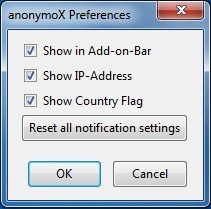
AnonymoX Preferences allows you to enable/disable the Show in Add-on-bar, Show IP-Address and Show Country Flag options. Additionally, you can also Reset the notification settings.
This add-on can also be useful if you do not want internet sites to keep on top of and monitor your web surfing around conduct. Check out the hyperlink below to set up this add-on, and look a the web without any constraints.
Enjoy and happy surfing!
If Orkut Blocked..Surf Anonymously using JAP
7:12 AM
Internet, IP Tricks, System Tricks
No problem if orkut/youtube etc is blocked in your office or college or school….and you are fed up of using proxy websites and there low urfing speeds.And what worse if these proxy websites are also blocked…..phew!!!!
But no problems….. Download JAP & Download Ultrasurf and easily surf any blocked website with anonymity
Step 1: Download JAP or ultrasurf
Step 2: Execute Setup file [may take few minutes depending upon internet speed]
Step 3: Change you Explorer LAN connection settings
Change the default gateway IP to 127.0.0.1 and port 4001
Thats it you have gained independence to free to surf any website….
But no problems….. Download JAP & Download Ultrasurf and easily surf any blocked website with anonymity
Step 1: Download JAP or ultrasurf
Step 2: Execute Setup file [may take few minutes depending upon internet speed]
Step 3: Change you Explorer LAN connection settings
Change the default gateway IP to 127.0.0.1 and port 4001
Thats it you have gained independence to free to surf any website….
How to find the “real” IP address of a web site? How to find the “real” IP address of a web site?
You can use the PING utility included with Windows to determine the “real” IP address of a web site. Before using this utility, make sure you are not mapping a host name to some IP address with HostName Commander, because if you do, the PING utility will show the address you’ve set up with HostName Commander, instead of the “real” IP address.
To run the PING utility, click on the Windows Start button, and choose Run from the Start Menu. If you use Windows 95,98, or Me, enter “command” (without the quotes) as the command line to run. If you use Windows XP,2000, or NT, enter “cmd” (again, without the quotes). Click OK and the command prompt window should appear on the screen.
Now enter the word “ping” (without the quotes) followed by a space, followed by the host name you want to determine the IP address of, and press Enter:

In this example, the IP address of the host name www.rkgit.edu.in is74.52.201.2 & IP Address of the host name www.kiet.edu is220.225.19.55 . (Keep in mind that the IP address may change in the future!). If the PING utility reports an error, make sure your computer is connected to the Internet when you are running it.
How To Access Remote Computers from Your Mobile Phone
Here i am giving you a cracked version of TeamViewer Pro for iPhone and iPod Touch that allow you to access remote computers from everywhere. It allows you to give spontaneous support as well as having permanent access to unattended computers. You can:
- Support your clients and colleagues spontaneously.
- Access your office desktop with all of its documents and installed applications.
- Remotely administer unattended computers (e.g. servers).
Features:
- Remotely access unattended computers
- Conveniently control remote computers using the iPhone multi-touch gestures: left click, right click, drag & drop, scroll wheel, zoom, change monitor
- Complete keyboard control incl. special keys such as Ctrl, Alt, Windows
- Remotely reboot the computer
- Automatically adjust the screen resolution of the remote computer
- Overview of computers that are online via the integrated Partner list
- Effortlessly access computers behind firewalls and proxy servers
- Meets highest security standards: 256 Bit AES Session Encoding, 1024 Bit RSA Key Exchange
How to know if the web server is Windows or Linux based
1) Goto the link below and find the IP Address of the website you want to gather information about. You may do this by writing its name in the Get IP box
http://www.selfseo.com/find_ip_address_of_a_website.php
(This step was optional just to tell you that it can be done this way also):-P
2)Goto run->type CMD
IN CMD type
ping Target _Website_Name . For Eg- ping google.com
or
ping target_website/computer_ip_address . For Eg:- 59.172.45.1
Now you will see several ping requests coming
Ping Google Server
We Are interested in seeing the TTL time which you can see at the end of each request in ping.
NOTE:-
1) If TTL <64 then the server is Linux based
2) If TTL>64 but <128 then the server is Windows bsaed
3) TTL>128 Mac and others.
From the above screenshot, it is clear that the servers of google are linux based.
Note:- In some Cases you may not get ping replies ( Eg. you try it on your friend’s PC ). Now This can have two reasons, The server is down ie.. The machine is not connected to internet. Else the most common reason, The Firewall is protecting that PC and is not allowing your request to access that system.
http://www.selfseo.com/find_ip_address_of_a_website.php
(This step was optional just to tell you that it can be done this way also):-P
2)Goto run->type CMD
IN CMD type
ping Target _Website_Name . For Eg- ping google.com
or
ping target_website/computer_ip_address . For Eg:- 59.172.45.1
Now you will see several ping requests coming
Ping Google Server
We Are interested in seeing the TTL time which you can see at the end of each request in ping.
NOTE:-
1) If TTL <64 then the server is Linux based
2) If TTL>64 but <128 then the server is Windows bsaed
3) TTL>128 Mac and others.
From the above screenshot, it is clear that the servers of google are linux based.
Note:- In some Cases you may not get ping replies ( Eg. you try it on your friend’s PC ). Now This can have two reasons, The server is down ie.. The machine is not connected to internet. Else the most common reason, The Firewall is protecting that PC and is not allowing your request to access that system.
Download Proxy Switcher Standard: Free IP Changer | Hide your IP
Proxy Switcher Standard – Free IP Changer:
Proxy Switcher is one of the best proxy softwares ever made and it is a perfect free IP Changer tool. This software automatically downloads and tests all proxy servers. So, you don’t need to search for any “free proxy list” on Google. This software can also automatically change your IP address every 5 minutes or so (available in Pro version) which makes it really useful.
Steps to use Free IP Changer:
1. Free download Proxy Switcher Standard to hide your IP address.
Download From Filesonic : http://www.filesonic.com/file/1832807294/ProxySwitcher.rar
Download From Oron: http://oron.com/zuzq2gsor13y
Password: www.umerrock.co
2. Go to Whatismyip.com and check your IP address.
3. Run and install this Free IP Changer software on your computer. Proxy Switcher will automatically start downloading and testing for “Live Proxy servers” as shown.
Password: www.umerrock.co
2. Go to Whatismyip.com and check your IP address.
3. Run and install this Free IP Changer software on your computer. Proxy Switcher will automatically start downloading and testing for “Live Proxy servers” as shown.
4. After it has tested all proxy servers, hit on “Basic Anonymity”. Here, you will get a list of all working “Alive Proxy servers”. Looking at the response time, choose 4-5 proxy servers (or even more, if required) with lowest Response Time and move these proxy servers to “Proxy Switcher” folder. You can use the highlighted button in top bar to move these proxy servers.
5. In Proxy Switcher folder, select the proxy server with minimum response time and hit on button highlighted in below image. Proxy Switcher will start using this Proxy server as your IP address.
Now, go to Whatismyip.com and check your IP address. You will find it different from Step 1. Thus, this Free IP Changer software has done the job for you.
Also, whenever you wish to change your IP Address, simply right click on Proxy Switcher icon in taskbar and select any proxy server you want.
Configuring Firefox to use Proxy Switcher:
If you’re using Firefox, you need to configure Firefox to use proxy server from this Free IP changer software.
6. After completing Step 5, open you Firefox. Go to Tools ->Options. Hit on Advanced ->Network Tab and then Settings to get this:
7. Enter, the information as below:
HTTP Proxy: localhost
Port: 3128
as shown in image.
Hit on OK. Now, Firefox will start using proxy server specified by Proxy Switcher software.
Thus, you are successful in hiding your Ip Address using this Free IP changer software. There are many such free IP Changer softwares available on web. I’ll be reviewing best of them in my coming articles.
Got stuck in setting up Proxy Switcher software??? No probs, simply share your reactions in comments. I am always there to help you.
Enjoy free IP Changer software to hide your IP address…
HTTP Proxy: localhost
Port: 3128
as shown in image.
Hit on OK. Now, Firefox will start using proxy server specified by Proxy Switcher software.
Thus, you are successful in hiding your Ip Address using this Free IP changer software. There are many such free IP Changer softwares available on web. I’ll be reviewing best of them in my coming articles.
Got stuck in setting up Proxy Switcher software??? No probs, simply share your reactions in comments. I am always there to help you.
Enjoy free IP Changer software to hide your IP address…